Introduction
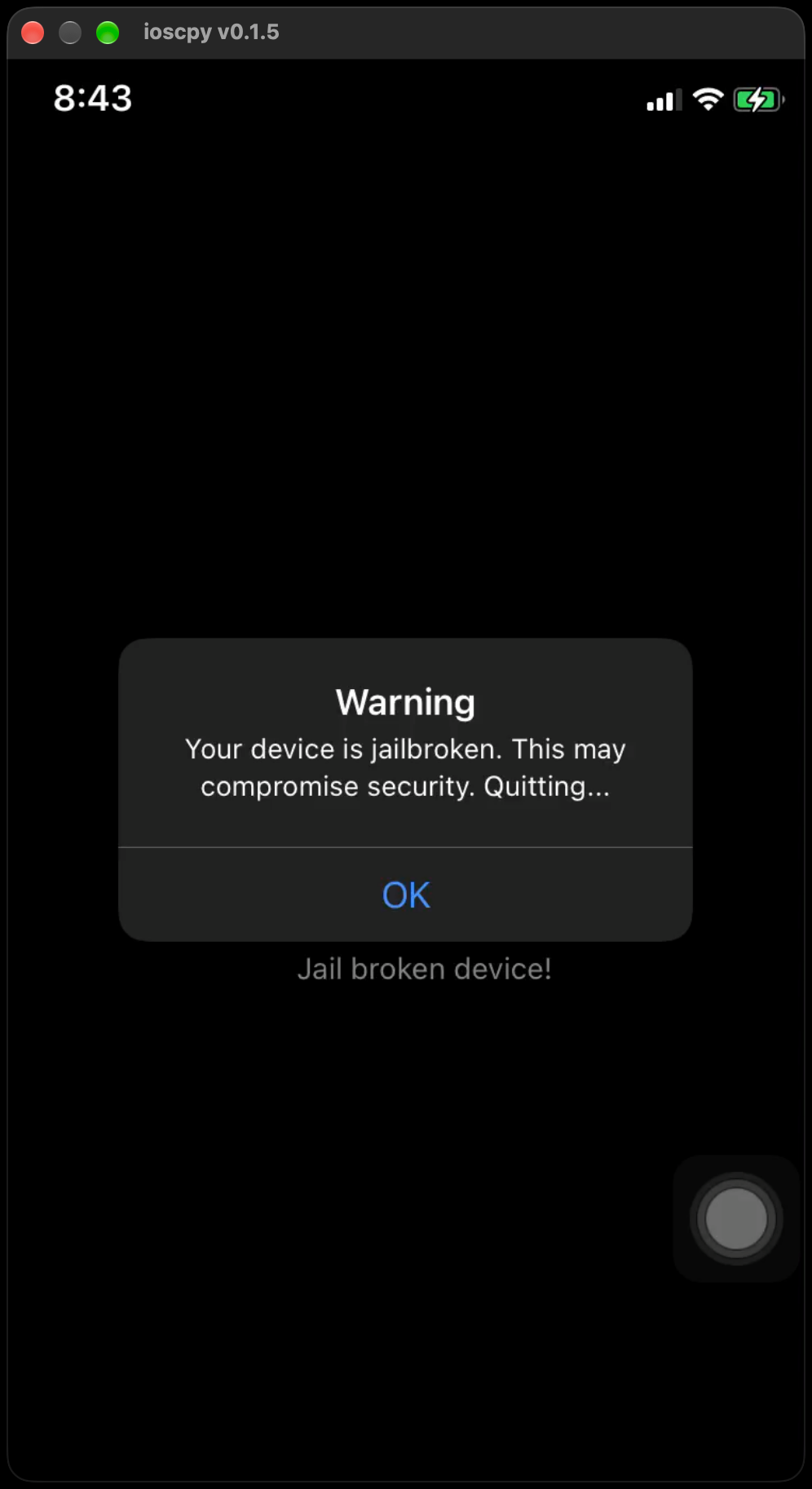
No Escape is an iOS challenge from Mobile Hacking Lab. Launch the app on a jailbroken phone and it slams the door: "Your device is jailbroken. This may compromise security. Quitting." The goal is to get past that check and reveal the hidden flag. I solve it three different ways — a Frida hook, a permanent binary patch, and a live LLDB debugger session. Each hits the same lesson from a different angle.
The whole challenge in one sentence
The app asks itself one question at launch — "Is this phone jailbroken?" — and answers it inside a single function called isJailbroken(). If the answer is yes, it shows the warning and hides everything. If no, it decrypts and shows the flag. Every solution method below does the same thing: force that one answer to "no."
Static analysis in Ghidra
We use Ghidra to read the detection statically before running anything. Load No Escape, let it auto-analyze, then search for the alert string and follow it back to the code that uses it.
Search → For Strings…, filter forjailbroken(oryour device).
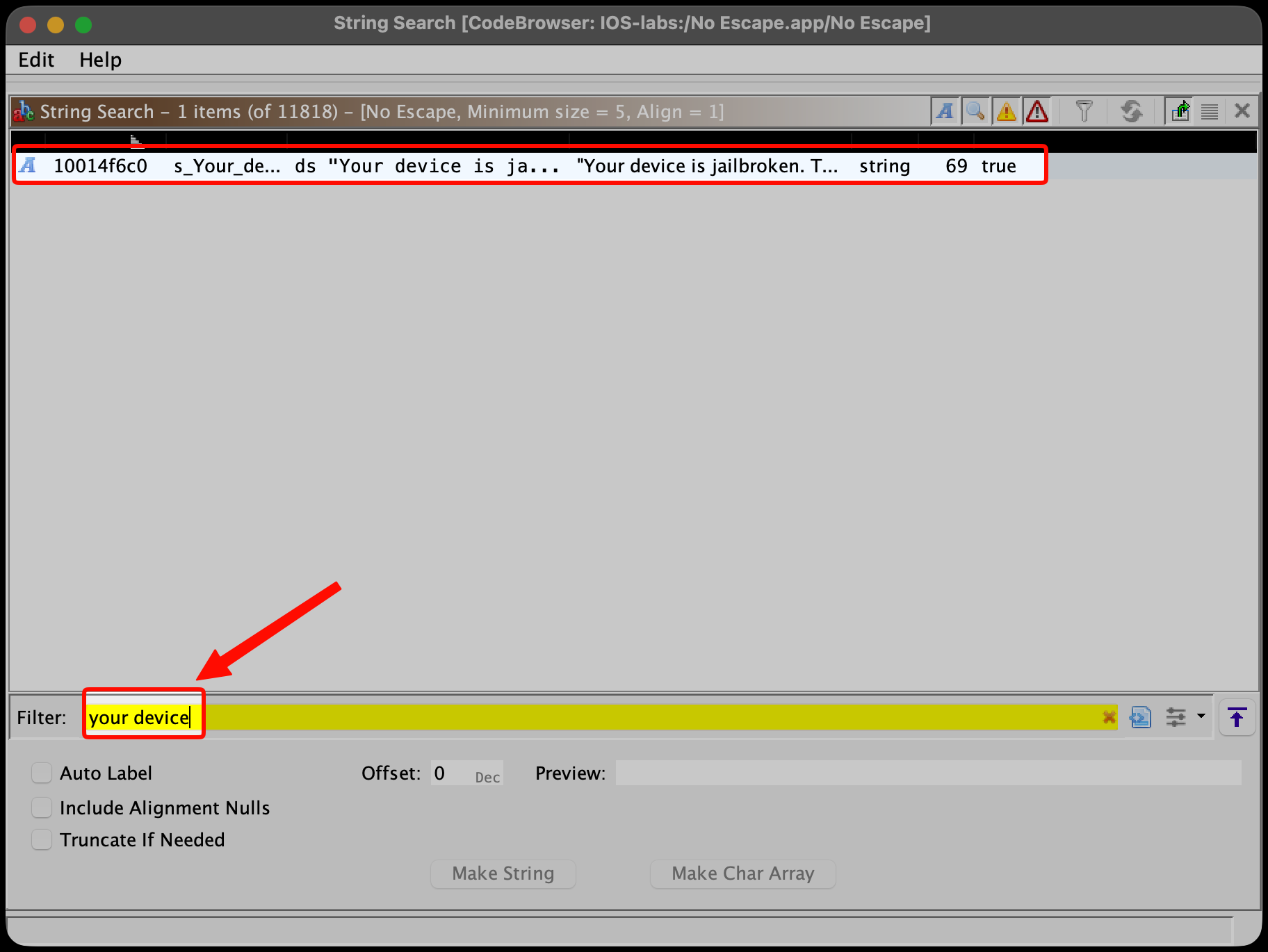
- Click the "Your device is jailbroken…" string.
- Right-click → References → Show References to — this jumps to the code that displays that alert, which sits right next to the function we care about.
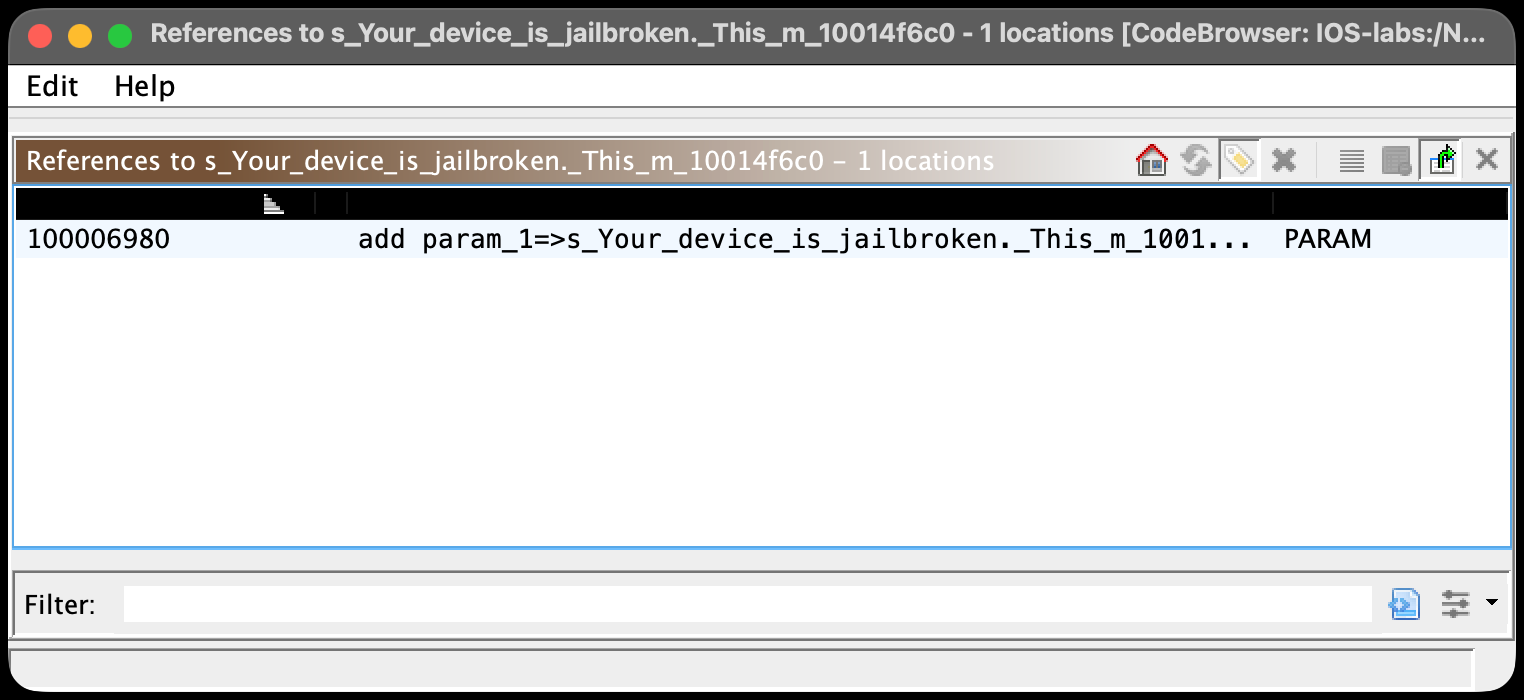
That reference lands in AppDelegate.application(_:didFinishLaunchingWithOptions:), whose body is essentially if (isJailbroken()) { showAlert("… Quitting…") }. The function it calls decompiles to:
/* No_Escape.isJailbroken() -> Swift.Bool */     // virtual address 0x10000a068
bool No_Escape::isJailbroken(void) { ... }
Its mangled symbol — the name we'll feed to Frida and LLDB later — is $s9No_Escape12isJailbrokenSbyF. (No disassembler handy? nm "No Escape" | grep -i jailbroken prints that symbol and its address straight from disk — …a068 T _$s9No_Escape12isJailbrokenSbyF — where the leading _ is dropped for Frida and the T means the symbol is exported.)
How the detection works
isJailbroken() is a logical OR chain of four separate checks:
bool isJailbroken(void) {
    if (checkForJailbreakFiles())            return true;
    if (checkForWritableSystemDirectories()) return true;
    if (canOpenCydia())                      return true;
    if (checkSandboxViolation())             return true;
    return false;
}
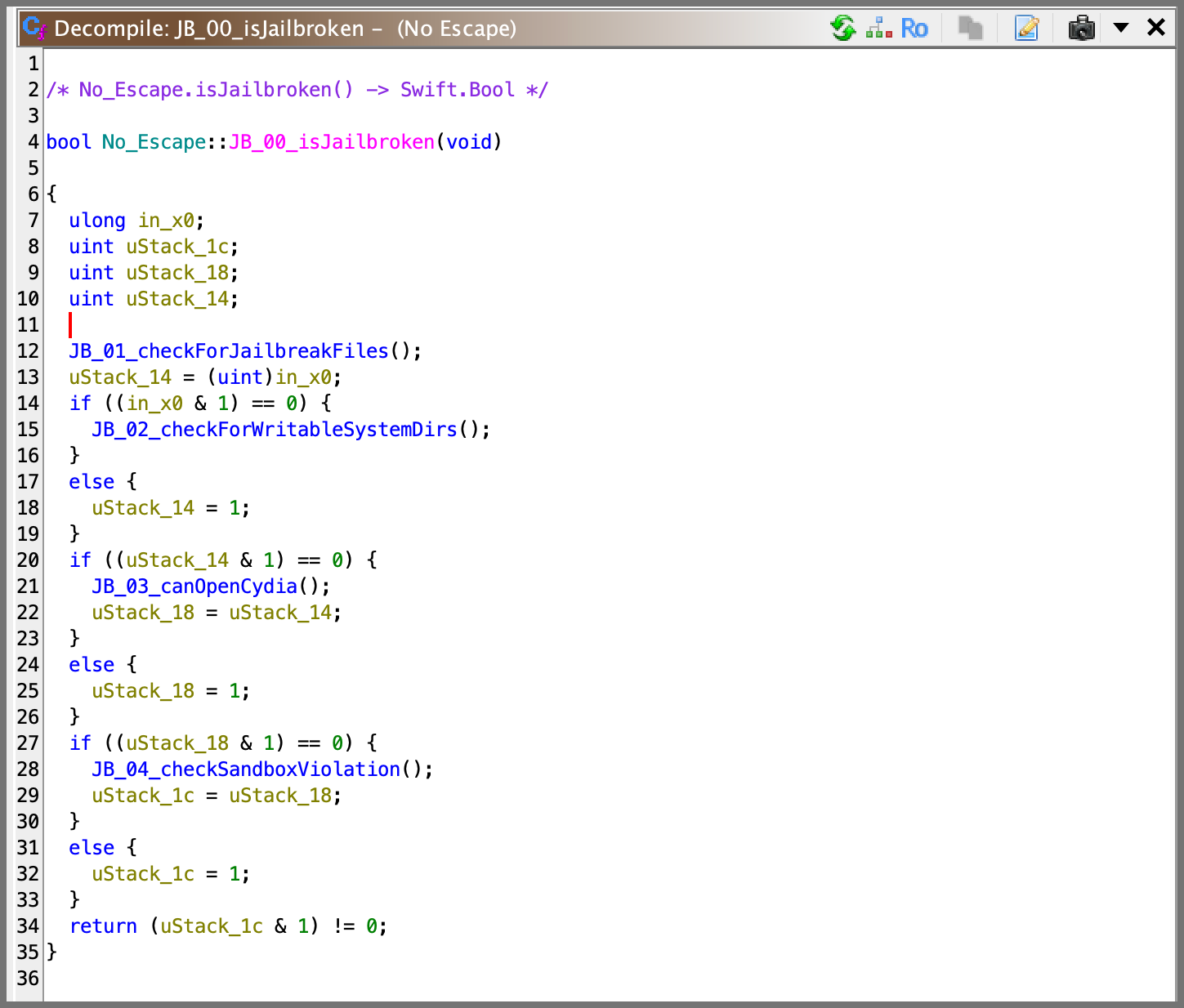
Any single check returning true makes the function report jailbroken; all four must be false to pass. Here's what each one actually probes:
| Check | Mechanism | What it's looking for |
|---|---|---|
checkForJailbreakFiles |
NSFileManager.fileExistsAtPath: over a path list |
jailbreak files: /Applications/Cydia.app, /Library/MobileSubstrate/MobileSubstrate.dylib, /bin/bash, /usr/sbin/sshd, /etc/apt, /bin |
checkForWritableSystemDirectories |
String.write(toFile:"/private/jailbreak_test.txt"), then deletes it |
whether it can write outside its sandbox (a normal app can't) |
canOpenCydia |
UIApplication.shared.canOpenURL("cydia://…") |
whether the Cydia app's URL scheme is registered |
checkSandboxViolation |
fileExistsAtPath:("/private/var/lib/apt/") |
the APT package directory a jailbreak installs |
You can read the raw material of the first two checks right in the decompiler — the hardcoded path list, and the sandbox write-test that tries to create /private/jailbreak_test.txt (with the contents "This is a test."):
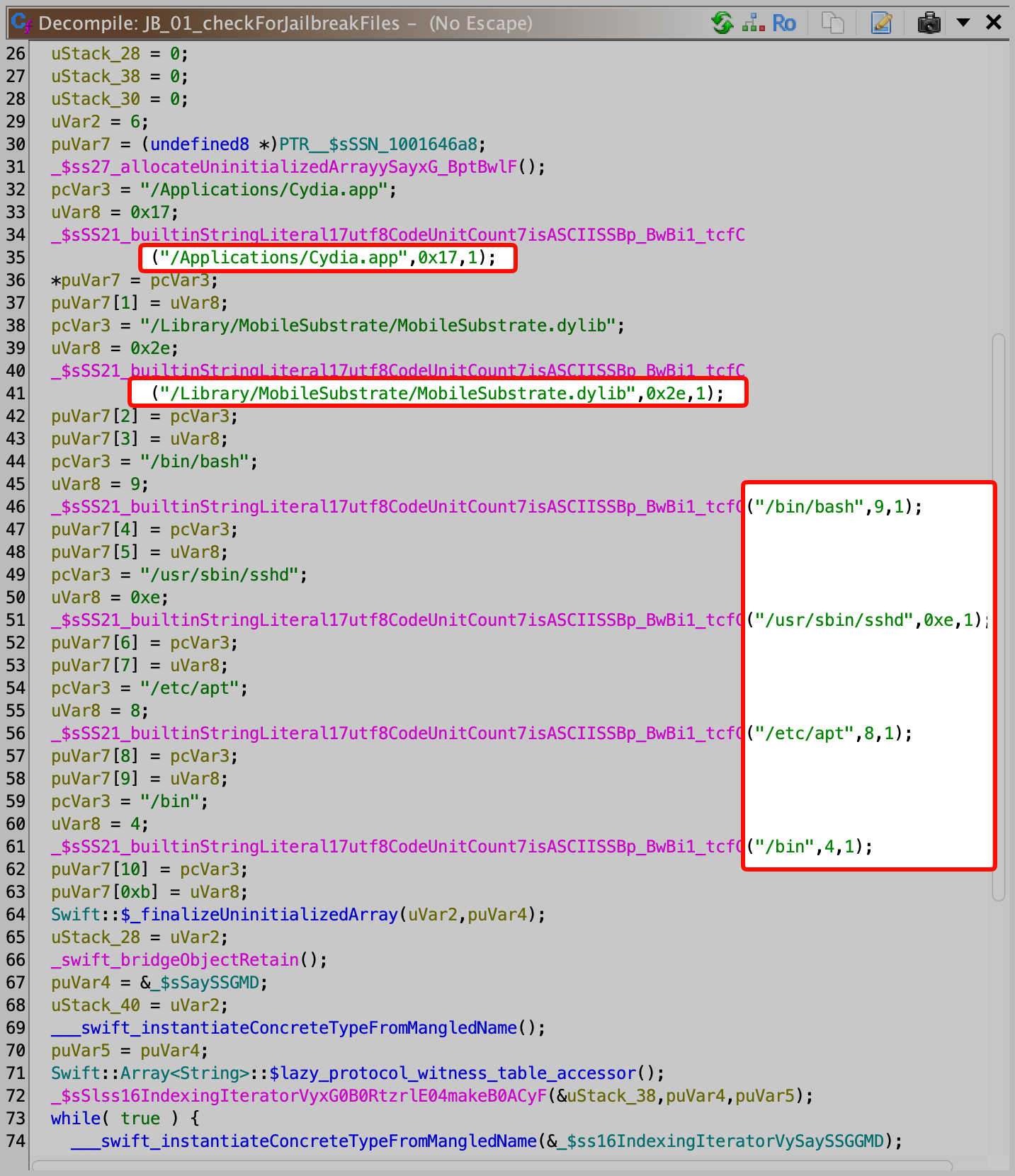

Ghidra tip — rename for readability. By default these functions show as noise like
$$No_Escape.(checkForJailbreakFiles_in_…). I renamed the whole cluster with aJB_prefix —JB_00_isJailbroken,JB_01_checkForJailbreakFiles, and so on — so they group together in Ghidra's Symbol Tree and the decompiler reads like real source. To rename: click the function name → pressL→ type the new name. (I scripted mine through the Ghidra MCP server, which lets me drive Ghidra programmatically, but doing it by hand takes seconds.)
The part that matters most
isJailbroken() is called from two places, and this is the crux of the whole challenge:
AppDelegate.application(_:didFinishLaunchingWithOptions:)— runs at launch. If jailbroken, it pops the "Quitting…" alert.ViewController.viewDidLoad()— runs when the main screen loads. Only on thefalse(not-jailbroken) branch does it take a hardcoded, CryptoSwift-Rabbit-encrypted blob, decrypt it, and paint the result on screen — that's the flag.
In other words, the jailbreak check is gating a secret: beat it and the app decrypts the flag for you.
Here's the first caller in Ghidra — AppDelegate's launch handler calling isJailbroken(), popping the "Quitting…" alert and return true-ing when it fires:
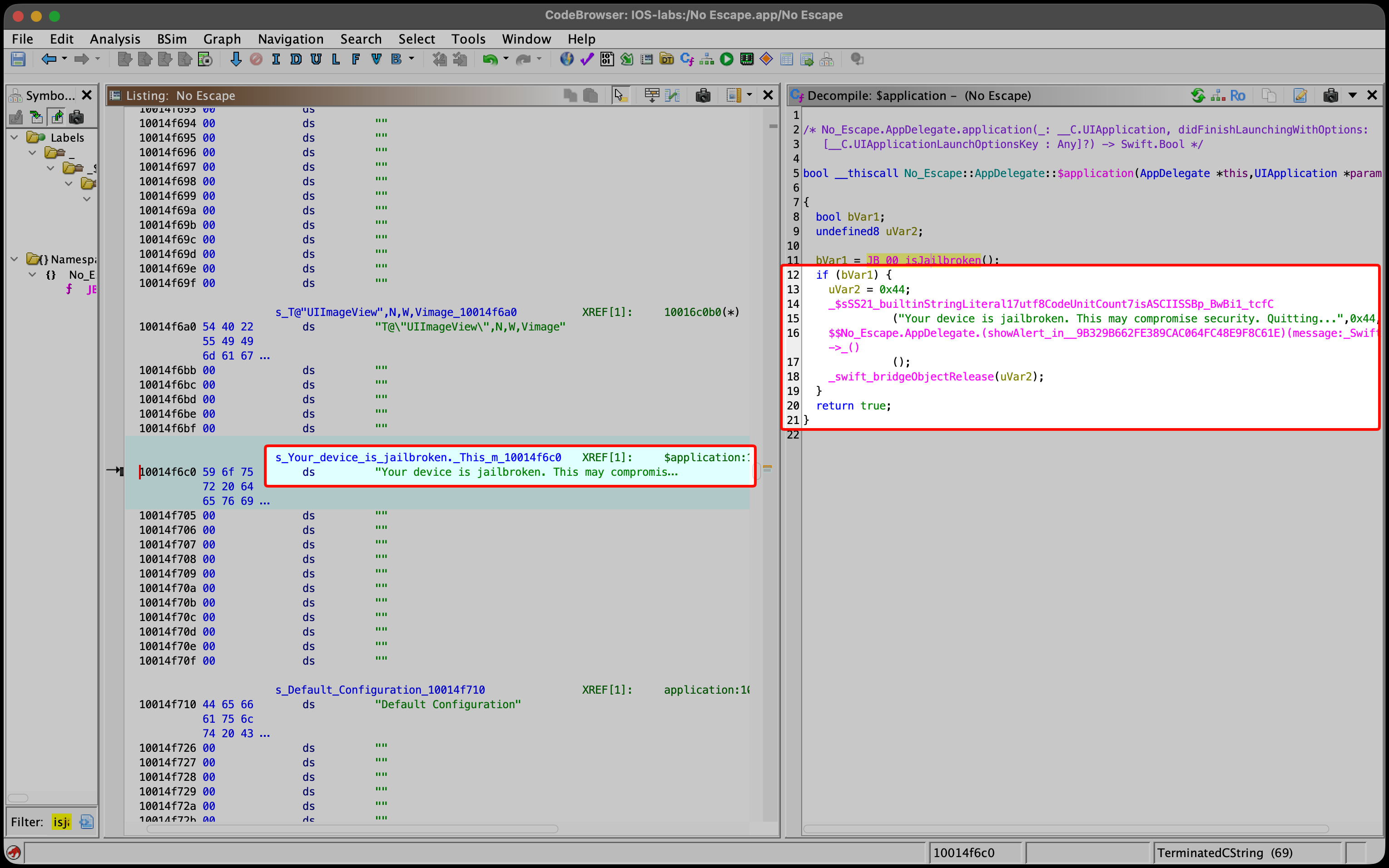
One idea that unlocks all three methods
On arm64 a function's return value lives in the x0 register — a Swift Bool is just its low bit (1 = jailbroken, 0 = clean) — so all three solution methods below are the same move: force x0 to 0 the moment isJailbroken() returns, at three different times with three different tools.
Method 1 — Frida (change the answer at runtime)
Frida hooks isJailbroken() live and rewrites its answer in memory — nothing on disk changes. The plan: let its four checks run normally, and the instant it returns, force x0 to 0.
// no-escape-bypass.js  (written for Frida 17)
const SYMBOL = '$s9No_Escape12isJailbrokenSbyF';   // mangled name of isJailbroken()

// Process.mainModule = the app's own binary. findExportByName resolves the
// symbol to its real, in-memory address (Frida resolves the ASLR-slid address at runtime).
const isJailbroken = Process.mainModule.findExportByName(SYMBOL);

Interceptor.attach(isJailbroken, {
  // onLeave runs at the function's `ret` — the moment it returns.
  onLeave(retval) {
    console.log('[*] isJailbroken -> ' + retval + ', forcing false');
    retval.replace(ptr(0));   // retval is x0 → force false
  }
});
console.log('[+] hook installed @ ' + isJailbroken);
- We hook only
onLeave, since we just need to rewrite the return value. retvalis that samex0register (see above), soretval.replace(ptr(0))clears it → the app believes the device is clean.- Because both call sites go through this one function, a single hook covers them both.
Running it. First make sure frida-server is installed and running on the jailbroken device (from the Frida repo in Sileo/Cydia). The check happens at launch, so we must spawn the app under Frida (start it fresh with the hook already installed) rather than attach after it's running — otherwise the check has already fired. That's what the -f flag does:
frida -H 127.0.0.1:27042 -f com.mobilehackinglab.No-Escape -l no-escape-bypass.js
(-H 127.0.0.1:27042 connects to a networked frida-server; on USB use -U instead: frida -U -f com.mobilehackinglab.No-Escape -l no-escape-bypass.js.)
Result: no alert, viewDidLoad takes its false branch, and the flag appears.
Method 2 — Binary patch (change the answer forever)
The Frida method needs Frida attached on every run. Patching edits the binary on disk once, so the bypass is permanent.
Finding the patch location
Ghidra shows isJailbroken() at virtual address 0x10000a068. __TEXT loads at VA 0x100000000 (file offset 0), so:
file offset = VA − 0x100000000 → 0x10000a068 − 0x100000000 = 0xa068
The patch itself
We want the function to return false and do nothing else, which takes just two arm64 instructions: mov w0, #0 (put 0 in the return register) then ret. We overwrite the function's first 8 bytes — its stack-frame setup — with those two.
Why is returning this early safe? On arm64, when a function is called the CPU remembers where to go back to by putting that address in a register called the link register (x30); ret simply jumps to whatever is in it. Our patch fires on the function's very first instruction — before it reserves any stack space or calls anything else — so x30 still holds the caller's address and the stack pointer hasn't moved. The function just hands back false and the app carries on exactly as if it had gotten a normal answer, with nothing left half-done to crash on.
Doing it in Ghidra
You don't need a hex editor. In the Listing view: click the first instruction → right-click → Patch Instruction → type mov w0, #0x0, Enter. Do the same on the next line, typing ret.
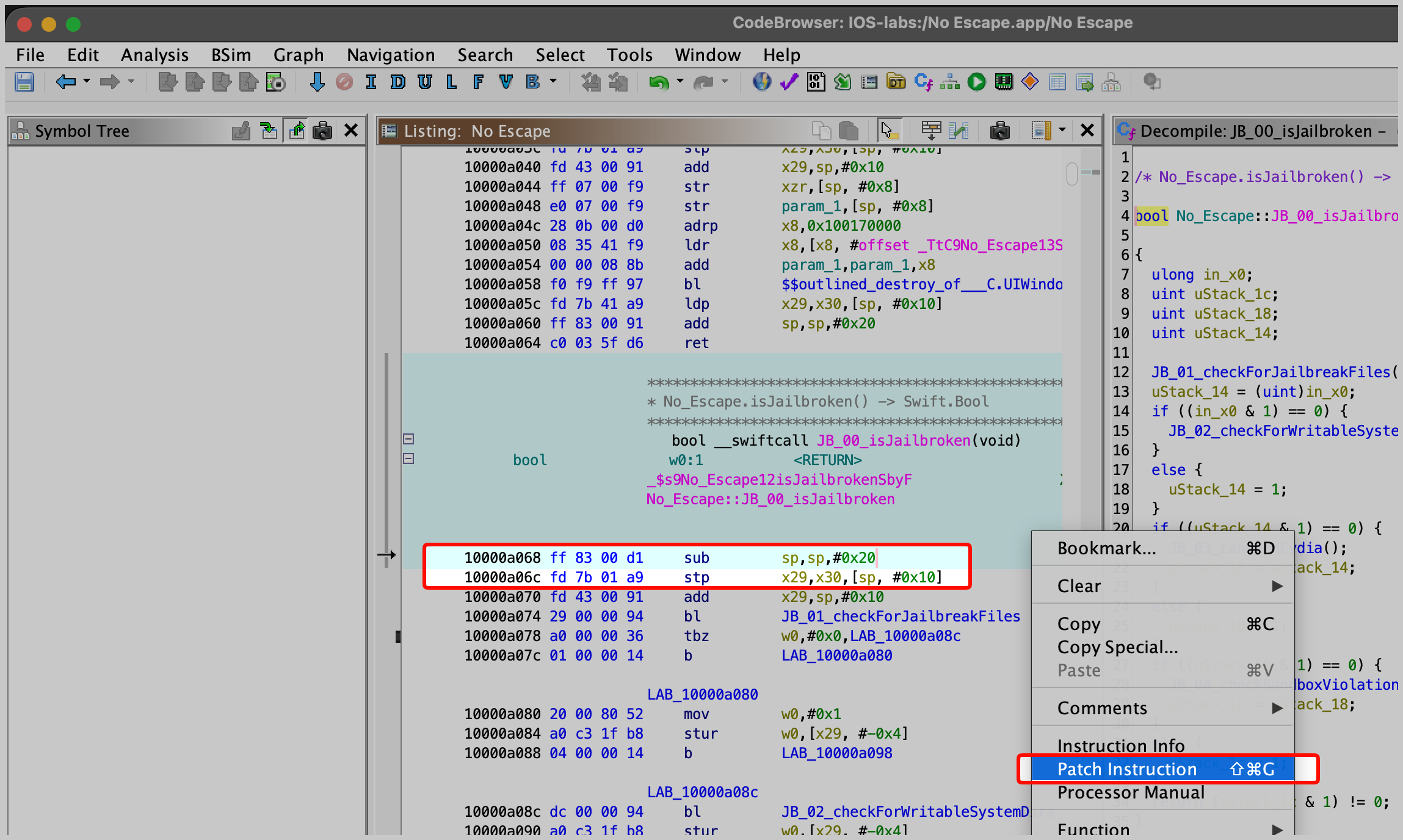
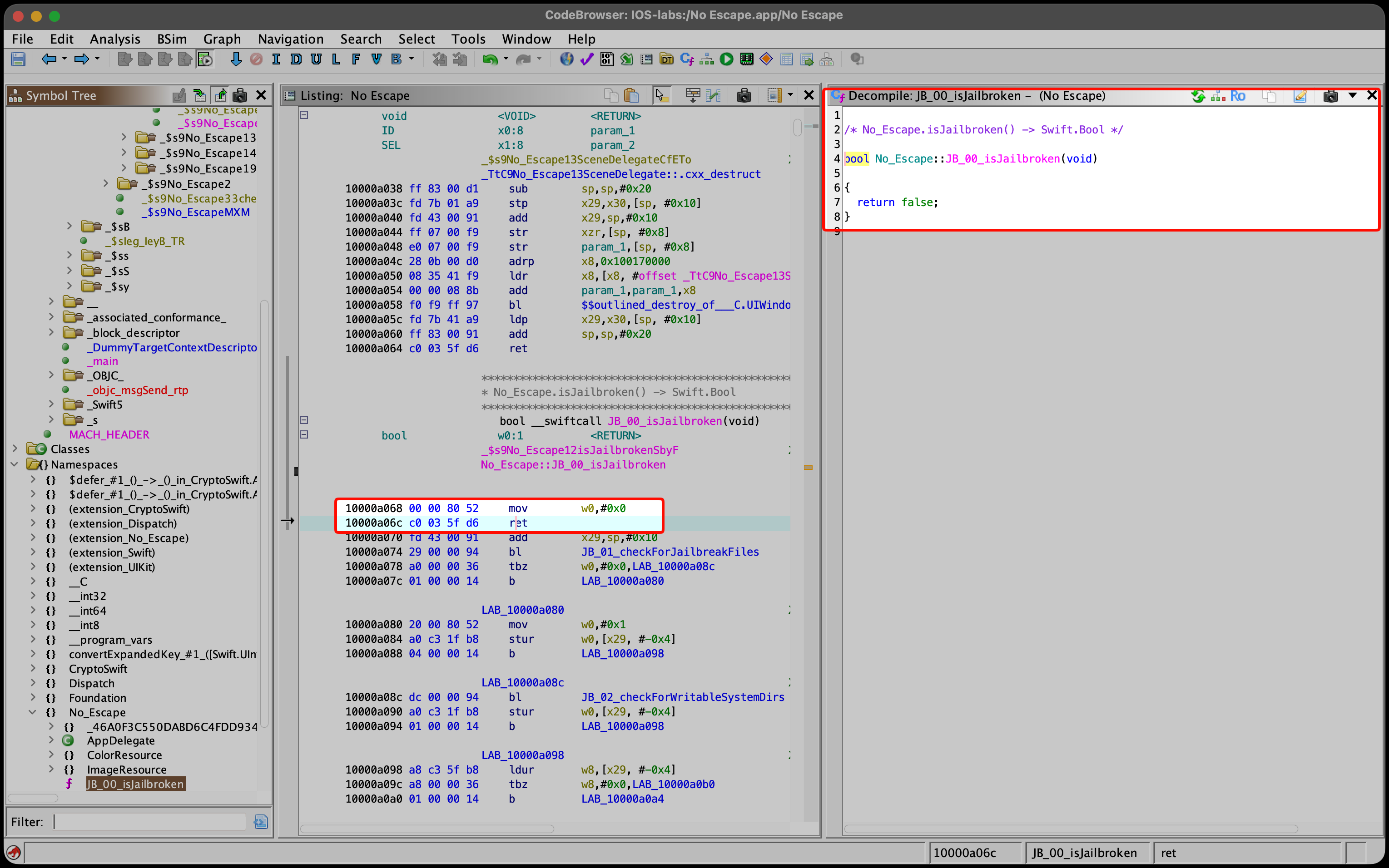
Ghidra re-decompiles instantly, and the whole function collapses to:
bool No_Escape::isJailbroken(void) { return false; }
That return false; is your proof the patch is correct:
Then export the modified binary — File → Export Program… → Format: Original File — and copy it over No Escape.app/No Escape inside the app bundle, replacing the original.
Re-signing (the part people forget)
Editing the bytes breaks the code signature, so re-sign before running:
ldid -S "No Escape"
ldid -S writes a fresh ad-hoc signature over your new bytes. On a normal iPhone only Apple can produce a signature the OS trusts — but AppSync Unified or TrollStore on a jailbroken device accept the non-Apple signer. So ldid (makes the signature internally valid) + the jailbreak (accepts a non-Apple signer) = your patched app runs.
Repackaging into an IPA
Finally, wrap it back into an IPA — the one rule is that the app sits inside a folder named Payload:
Payload/
└── No Escape.app/     ← your patched, re-signed bundle
Zip the Payload folder and rename the result to No Escape.ipa. Install with TrollStore or Sideloadly (they handle final signing), launch, and the flag appears — no Frida, no debugger, it's baked in.
Method 3 — LLDB (change the answer live, by hand)
The most hands-on method. LLDB is Apple's debugger (it ships with Xcode). We pause exactly at isJailbroken()'s return and edit x0 by hand.
Prerequisites:
- On the iPhone:
debugserverand SSH access. - On the Mac: LLDB and a disassembler (Ghidra) to look up one address.
Step 1 — Find the ret instruction
Instead of the function's start, we break at its ret (the instruction that hands the answer back). In Ghidra, the end of isJailbroken() looks like:
10000a108   and  w0, w8, #0x1     ← keeps only bit 0, so w0 is exactly the Bool (0 or 1)
   ...                              (a couple of frame-restore epilogue instructions)
10000a114   ret                    ← and returned here  ← our breakpoint
Its file offset is 0xa114 (0x10000a114 − 0x100000000). We break here because by this point all four checks have run and x0 already holds the final verdict — we just flip it at the last instant.
Step 2 — Understand ASLR, because it changes our address
The load base is randomized each launch, so Ghidra's 0xa114 is only an offset: the real address is (this launch's base) + 0xa114, different every run. We can never hardcode the final address — we read the base fresh each launch and add our offset.
Step 3 — Catch the app at launch, through a tunnel
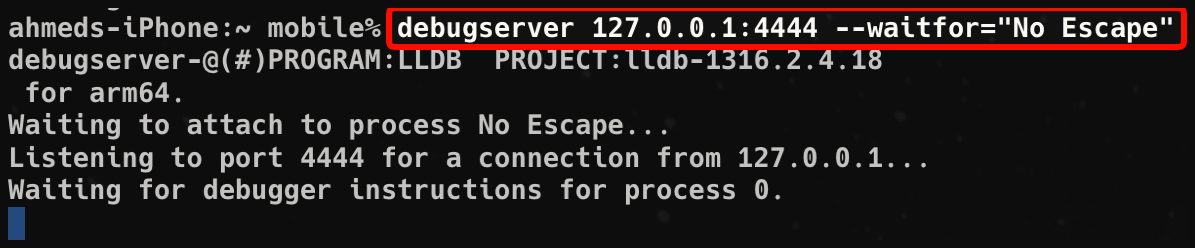
The check runs immediately at launch, so we tell debugserver to wait for the app and grab it before its code runs.
There's a wrinkle: many debugserver builds are picky about who is allowed to connect and will reject a direct connection from your Mac over Wi-Fi. The fix that works on every build: SSH-tunnel the connection through the phone's own loopback (127.0.0.1) so debugserver sees a local peer and accepts it.
# On the Mac — SSH into the phone AND forward port 4444 through the tunnel:
ssh -L 4444:127.0.0.1:4444 mobile@<iPhone-IP>

# In that same SSH session — start debugserver on loopback, waiting for the app:
debugserver 127.0.0.1:4444 --waitfor="No Escape"
Now tap No Escape on the phone. The screen goes black and sits there — that means debugserver caught it and is holding it frozen before it could run its check.
Step 4 — Connect LLDB
Because of the tunnel, LLDB connects to your Mac's localhost (which is forwarded to the phone):
lldb
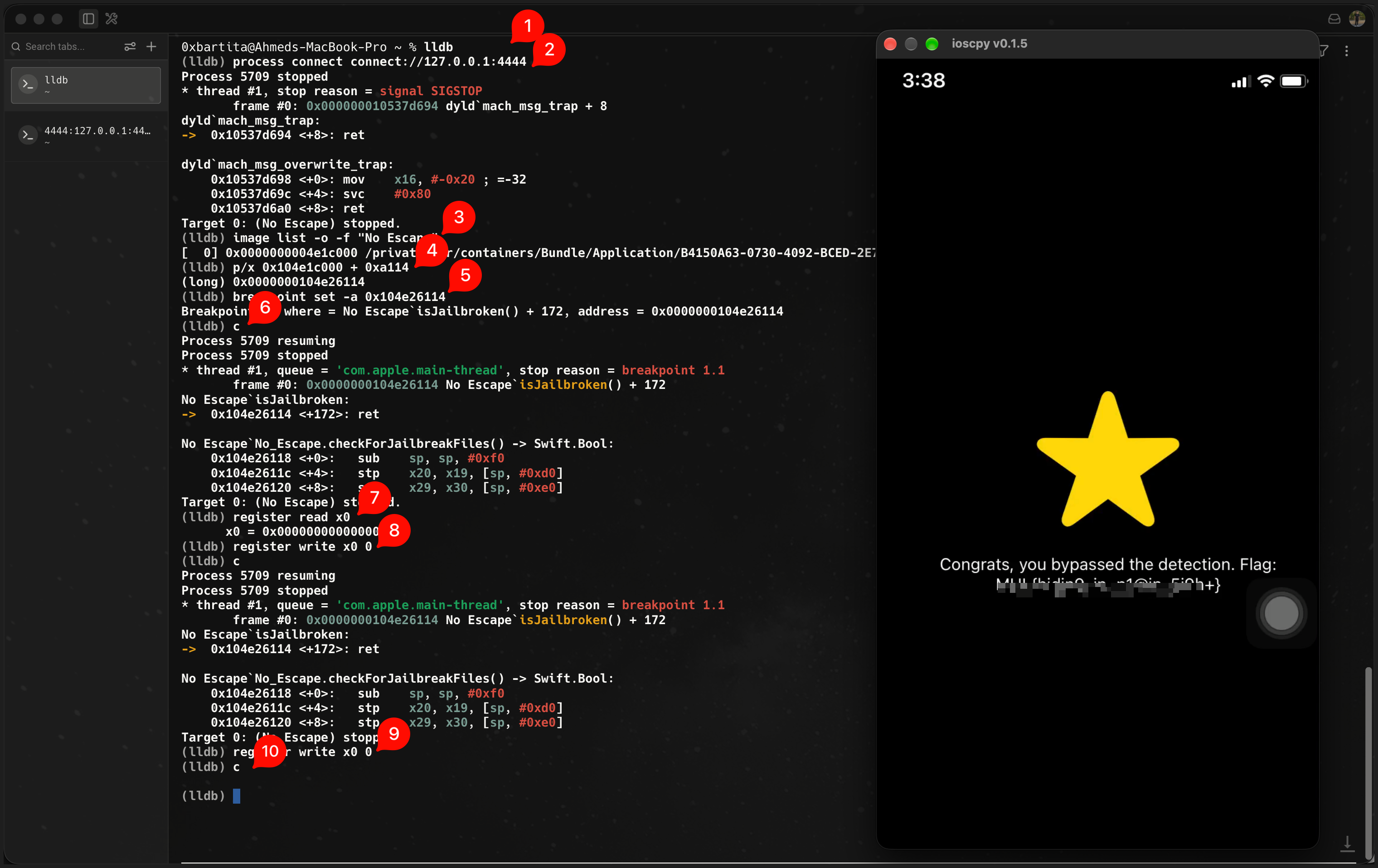
(lldb) process connect connect://127.0.0.1:4444
Step 5 — Turn the offset into this run's real address
Ask LLDB where the app actually loaded this launch:
(lldb) image list -o -f "No Escape"
[  0] 0x…04e1c000  /…/No Escape.app/No Escape (0x104e1c000)
The value in parentheses (0x104e1c000 here — different every launch) is this run's load base; the first column is the ASLR slide. Add our ret offset — LLDB can do the math:
(lldb) p/x 0x104e1c000 + 0xa114        →  0x104e26114     (runtime address of the ret)
(lldb) breakpoint set -a 0x104e26114
Step 6 — Continue, then flip x0 — twice
(lldb) c                       # continue — let the app run to the breakpoint
(lldb) register read x0        # read the verdict (expect 0x1)
(lldb) register write x0 0     # overwrite it with 0 = "not jailbroken"
(lldb) c                       # continue
Which caller am I stopped at? isJailbroken() runs from two places, so the breakpoint hits twice. To tell which one, run register read (the full list, not just x0) and look at lr (the link register) — it holds the address of whoever called the function, like caller ID. First hit: AppDelegate (the launch check). Second hit: ViewController.viewDidLoad (the one that reveals the flag).
Because isJailbroken() runs at both call sites (see "The part that matters most"), the breakpoint fires a second time. Do the exact same thing again:
(lldb) register write x0 0
(lldb) c
After that second flip, viewDidLoad runs its decrypt branch and the flag appears on the phone. Here's the whole session end to end — connect, read the ASLR base, break at the ret, flip x0 twice, flag:
The one rule that avoids a crash: only edit
x0at theisJailbrokenbreakpoint — never at the initial launch stop, or startup crashes inlibsystem_pthread. Continue first, edit second.
Troubleshooting (the walls I actually hit)
Most LLDB writeups make this look frictionless; on a real device it wasn't. Here's every wall and its fix:
rejecting incoming connection from … (expecting …)/Connection shut down by remote side while waiting for reply to initial handshake packet— yourdebugserverbuild enforces a strict peer check (it only accepts a connection whose source address matches what it was bound to). Over Wi-Fi your Mac's IP gets rejected. Fix: the SSH tunnel above — the connection then arrives from the phone's own loopback, which every build accepts. (Older builds are permissive, which is why most writeups never hit this.)

zsh: no matches found: *:4444— the shell tried to expand the*. The loopback/tunnel approach avoids*entirely, so this never comes up.- App crashes on
continuewithEXC_BREAKPOINTinlibsystem_pthread(brk #0x1) — you editedx0too early, at the launch stop, before the app ran. Continue to theisJailbrokenbreakpoint first. register read x0shows something odd like0x10004005instead of0x1— same cause: you're readingx0at the wrong stop (the launch point), not at the breakpoint.- Breakpoint address is wrong after a relaunch — ASLR reshuffles the base every launch, so a previous
base + 0xa114is stale. Re-runimage listand recompute.
The flag
All three methods land in the same place — the door opens and the hidden screen appears:
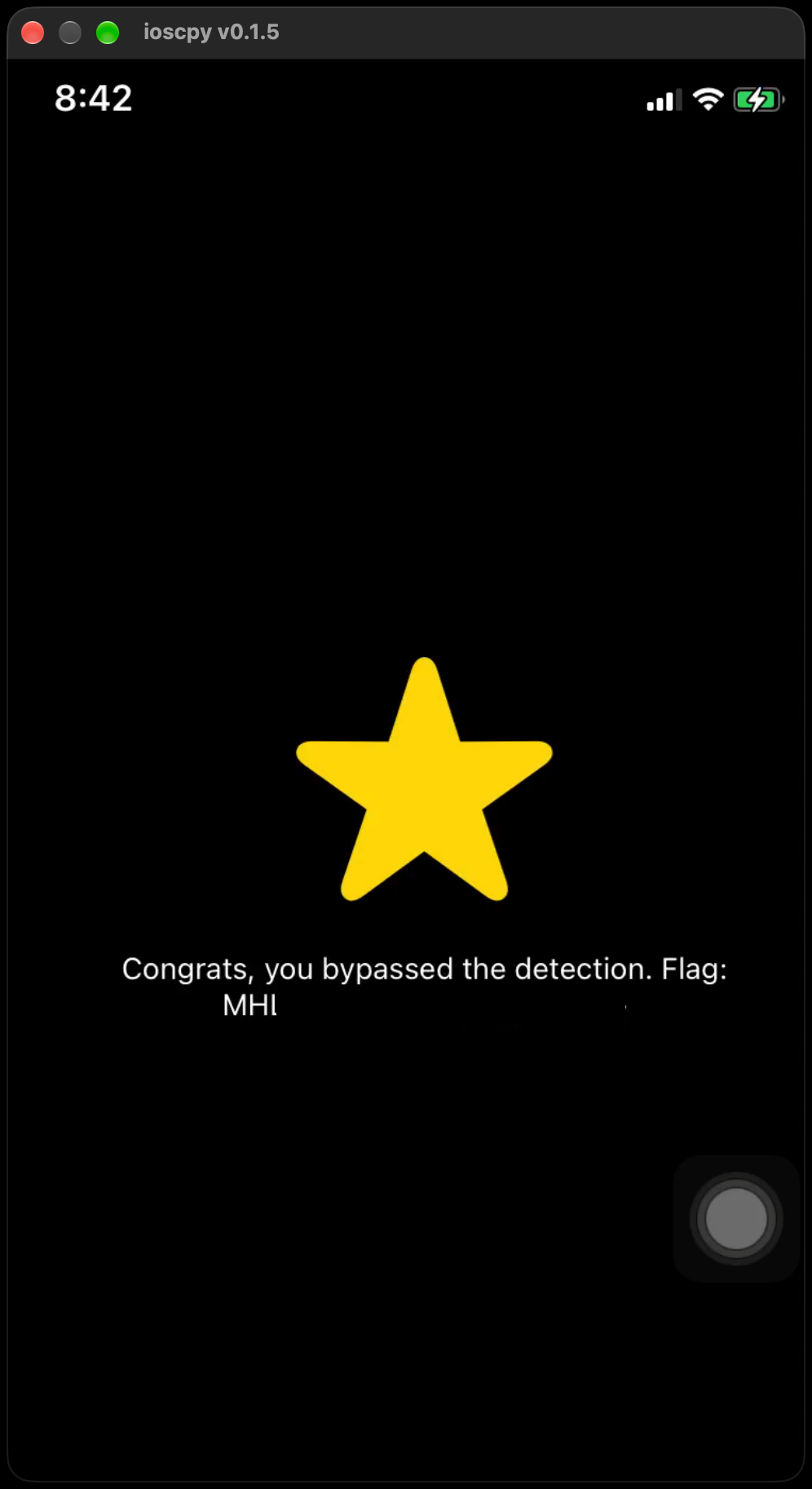
Congrats, you bypassed the detection. Flag:
MHL{…}
The three methods compared
| Method | What you change | When | Persists? | Best for |
|---|---|---|---|---|
| Frida hook | the return value x0, via a script |
at the function's return, every call | only while attached | fast, precise, one hook covers both call sites |
| Binary patch | the code on disk (8 bytes) | once, permanently | yes (needs re-sign) | a standalone modified build |
| LLDB | register x0, live, by hand |
at the return, interactively | only during the session | seeing the mechanism |
Frida edits x0 by script, the patch removes the code that could ever set it to 1, LLDB lets you type the change yourself.
Loading comments...